

If you mostly make one-off parts, repair components, or move the table back and forth for short cuts, manual feed is often enough. If you run long passes or repeat the same cuts throughout the day, power feed can make the job less tiring. It keeps the table moving at a set rate, but it does not automatically make a cut faster or more accurate.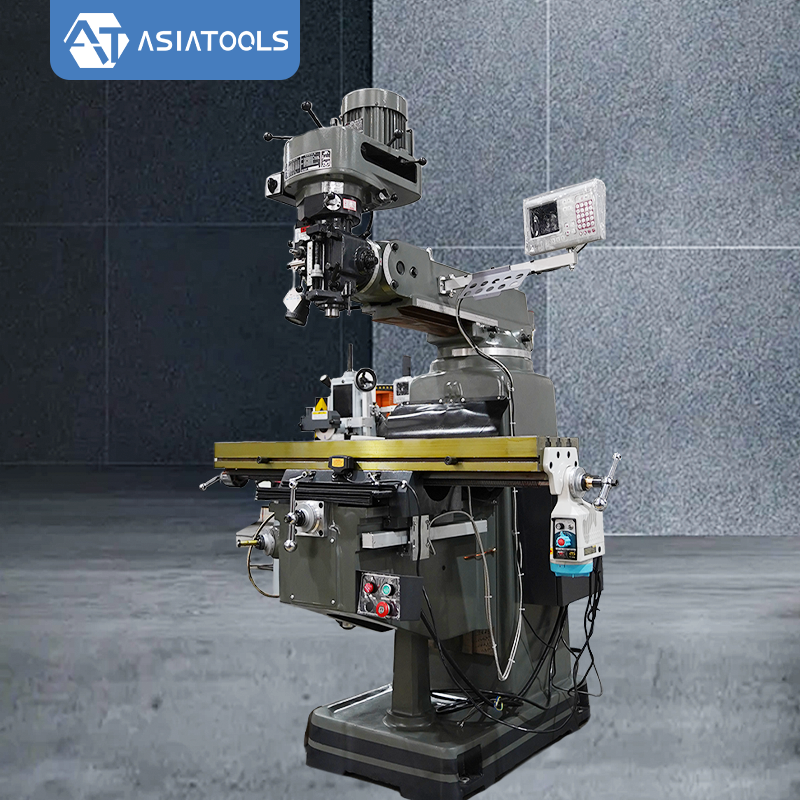
Manual Feed vs Power Feed
| What to Compare | Manual Feed | Power Feed |
|---|---|---|
| How it moves the table | You turn the handwheel | A motor moves the selected axis |
| Long passes | You keep turning the handwheel | The motor handles the table movement |
| Feed rate | Depends on how steadily you turn the wheel | Easier to keep at a chosen rate |
| Short positioning moves | Simple and direct | May not save much time |
| Repeated passes | You repeat the hand-feeding work | Repeated movement is easier to manage |
| Accuracy | Depends on setup, machine condition, tooling, and operator skill | Depends on those same factors; power feed alone does not improve accuracy |
| Cost and upkeep | Usually lower if no powered unit is fitted | Costs more to buy and install, with extra parts to maintain |
Table feed and quill feed are not the same thing. Table power feed moves the worktable along an axis, often the X-axis. Quill feed moves the spindle quill up and down. Check which type a machine or accessory offers before comparing prices or specifications.
When Manual Feed Is a Good Fit
With manual feed, you move the table by turning a handwheel. It works well for repair jobs, one-off parts, short cuts, and setups where you often stop to measure or reposition the workpiece.
- If you only use the mill now and then, buying a separate power-feed unit may not be worth the cost.
- For small positioning changes, the handwheel gives you direct control.
- For jobs that change from one part to the next, manual movement can be simple and practical.
The downside shows up on long passes. You have to keep turning the wheel, and the feed rate can vary with your hand movement. That does not make manual feed inaccurate by nature; the result still depends on the machine, setup, tooling, and operator.
When Power Feed Is Worth Considering
A power-feed unit uses a motor to move a selected axis at a set rate. Controls differ from one unit to another. Some have feed-speed adjustment and direction controls; travel stops or limit switches may also be fitted.
- On long passes, the motor takes over the steady table movement.
- When you repeat similar cuts across a batch, you do less of the same handwheel work.
- A suitable setting makes it easier to keep the chosen feed rate during the cut.
You still need to choose the cutting conditions, secure the workpiece, and watch the cut. A power-feed unit moves the table; it does not run the whole machining process for you.
Work Out the Table Travel Time
Table travel time (minutes) = travel distance (mm) ÷ actual feed rate (mm/min)
For example, a 300 mm pass at an assumed feed rate of 100 mm/min takes 3 minutes of table travel. The feed rate here is just for the calculation. It is not a recommended setting for every material, cutter, or machine.
The ASIATOOLS F4 turret milling machine page lists 760 mm of X-axis travel, 350 mm of Y-axis travel, 350 mm of Z-axis travel, a 1270 × 254 mm table, and a 300 kg table load. The 760 mm figure is the machine's published X-axis travel, not a promise that every job can use the full distance. The workpiece, fixture, cutter clearance, and setup all affect how much travel is available for an actual cut.
The F4 feed options also need checking. The main product page describes automatic feed on the X, Y, and Z axes. The F4 store listing, however, shows X-axis servo feed as standard and Y-axis servo feed as optional. Before ordering, ask which feed axes are included in the exact configuration being quoted.
The calculation above covers table travel only. It does not include setup, approach and return movements, loading, measuring, tool changes, or inspection. To compare manual feed with power feed fairly, time the same job under the same cutting conditions.
Checking the feed setup on a turret mill?
Share the feed axes you need, your workpiece size, the approximate pass length, and the table-load requirement. These details help clarify which machine configuration fits the job.
Discuss Feed and Travel RequirementsAccuracy and Surface Finish
Power feed controls table movement, but it cannot fix other problems with the machine. If a job needs tight tolerances or a particular surface finish, check the basics first:
- Backlash and wear: Worn feed screws, nuts, or other parts can affect positioning, especially when the table changes direction. Deal with excessive wear before adding power feed.
- Tool condition: A cutter's shape, sharpness, and wear all affect the cut and the surface it leaves.
- Workholding and rigidity: The workpiece, vise, clamps, and machine need to hold firm against cutting forces.
- Cutting settings: Feed rate, spindle speed, depth of cut, material, and cutter choice need to suit the job.
- Measurement: Check the finished part with suitable measuring tools.
Estimate Whether Power Feed Will Pay Off
Only count the operator time that can actually be used for other productive work. If someone still needs to watch the cut from start to finish, the main gain may be less handwheel effort, not lower labor costs.
- Annual capacity value = operator hours genuinely freed up per year × loaded hourly labor cost.
- Annual net benefit = annual capacity value − additional operating and maintenance costs.
- Simple payback period (years) = total installed cost ÷ annual net benefit.
Include the unit, mounting parts, installation, and any required electrical work in the installed cost. If annual net benefit is zero or negative, there is no useful payback period to calculate. The value of freed-up time is not automatically a cash saving; the workshop must be able to put that time to productive use.
For a realistic estimate, record the number of passes, actual pass length, feed rate, time spent hand-feeding, interruptions, and whether the operator can do other work while the table moves under power. Compare the same jobs rather than relying on a general productivity claim.
Power-Feed Compatibility Checklist
- Machine model: Check compatibility with the exact model. Similar table sizes do not guarantee that a unit will fit.
- Feed axis: Decide whether you need X-axis feed, cross-feed, or another powered movement.
- Mounting and drive: Check the mounting points, drive connection, shaft arrangement, and any adapters needed.
- Feed-rate range: Make sure the available settings suit the material, cutter, spindle speed, depth of cut, and machine rigidity.
- Usable travel: Make sure the installed unit will not block the table movement or workholding you need.
- Electrical supply: Confirm voltage, frequency, current, controls, and installation requirements in the unit documentation.
- Stops and controls: Check how direction and stopping work, and whether travel stops or limit switches are fitted.
- Service and parts: Check the manual, spare-parts availability, technical support, and warranty terms.
If your jobs need automated positioning, measurement, and machining, compare your part and tolerance requirements with the ASIATOOLS CNC vertical milling machine range. Conventional power feed moves an axis at a selected rate. CNC control can run programmed movements within the machine's capabilities.
Need to check a machine before requesting a quote?
Send the machine model, material, workpiece dimensions, required feed axis, and batch size. Confirm the feed options, usable travel, and electrical requirements for the exact model before you buy.
Request a Machine Configuration ReviewCan Manual Feed and Power Feed Be Used on the Same Machine?
Some machines keep the manual handwheel when a power-feed unit is installed; others use a different setup. Check the manual to see whether the handwheel remains available and how to switch powered movement on or off. Do not assume both modes can be engaged at the same time.
Safety
OSHA's machine-guarding rule covers hazards at the point of operation and other dangerous machine areas. Milling machines are among the equipment that may need point-of-operation guarding. [1]
- Secure the workpiece and use workholding that suits the cut.
- Keep tools, cables, and loose objects clear of the table's travel path.
- Use the required guards and follow the instructions for your machine.
- Keep loose clothing, jewelry, and unsecured long hair away from rotating parts.
- Do not measure the workpiece or clear chips while the cutter is rotating.
- Do not treat a travel-limit switch as a substitute for guarding or supervision.
The UK Health and Safety Executive advises using suitable machinery, keeping safeguards in working order, training operators, and following the manufacturer's instructions. [2] Before servicing or maintaining powered equipment, isolate it using the applicable procedure. OSHA's hazardous-energy control standard covers situations where unexpected startup or energization could cause injury during covered maintenance work. [3]
Before You Choose
Check the feed axes you need, the usable table travel, machine compatibility, and total installed cost against the jobs you run most often. For short, varied work, manual feed may be all you need. For long or repeated passes, power feed can make the day easier.
Machine specifications and operating procedures vary by model. Confirm the quoted configuration and follow the manuals for the exact machine and power-feed unit.